Understanding the Bandwidth Speed Widget
Use the Bandwidth Speed Widget to estimate the upper limits of your network capacity and diagnose connectivity issues.
Widget Functionality
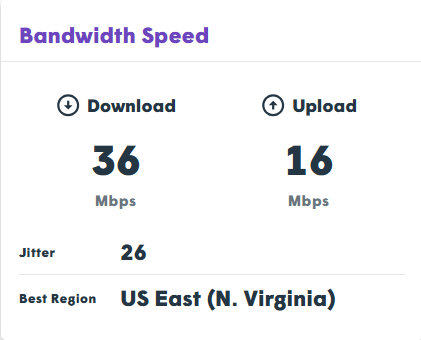
The Bandwidth Speed Widget performs an HTTPS speed test from your device to the TytoCare data center. It identifies whether you are on a high-speed fiber link, ADSL, or a slower mobile connection by measuring the raw data transfer capacity.
Technical Data Points
| Metric | Significance |
|---|---|
| Best Region | The data center selected for testing based on physical location and lowest DNS latency. |
| Uplink | The speed at which you send data (video/audio) to the server. Higher is better. |
| Downlink | The speed at which you receive data (clinician’s video) from the server. Higher is better. |
| Jitter | The variation in delay between received packets. Lower values indicate a stable connection. |
Critical Insights for Admins
- Capacity Focus: Unlike WebRTC tests that use UDP, this test uses HTTPS (TLS). It measures raw capacity rather than real-time media performance.
- Symmetry: Telehealth requires a stable Uplink of at least 2 Mbps. Mobile and ADSL links often have high Downlink but insufficient Uplink.
- No Results? If the widget fails to display data, it is a strong indicator that firewall rules are blocking the speed testing server.