Clinician / Physician Status in Clinician Dashboard
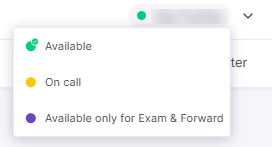
The Clinician Station allows providers to manage their real-time availability for patient visits. Your current active status will be highlighted in the interface, and you can manually switch between states by clicking the desired status icon.
- Available: You are online and ready to accept patient invitations and visits. One of these items will be highlighted, indicating your current status. You may also click on an item to change your status.
- On Call: The provider receives a text message whether he/she is logged-in or not. A patient can select a physician for a telehealth session even when the physician is logged-out.
- Available only for Exam & Forward: You are offline and cannot accept invitations or visits. This status indicates that only offline exams forwarded by the patient can be received.