Video Quality Widget Guide
Widget Overview
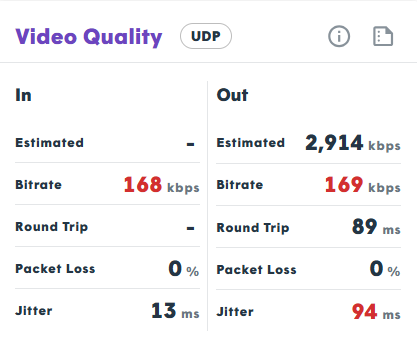
The Video Quality Widget tests the video throughput in WebRTC when connecting to a media server. The specific media server used depends on the infrastructure being tested. This tool is essential for understanding the connectivity and quality achievable in calls that require media servers, such as group video sessions or recorded exams.
How the Test Works
This test establishes a WebRTC peer connection directly to the media server of the tested infrastructure. It sends a video stream and then receives that same video back as an “echo” through the media server to measure the incoming bitrate achieved. This provides a realistic approximation of what to expect in a video session, though several factors should be considered:
- Short-term Estimates: Bandwidth is dynamic; because the test is conducted over a short period within the browser, estimates may fluctuate.
- Echo Capping: The received video is an echo of the sent stream. This means the result is capped by your available uplink bandwidth and the complexity of the video being transmitted.
Metrics Collected and Shared
The widget displays incoming and outgoing media metrics. Because networks are asymmetric, these columns offer different insights into your connection quality:
| Metric | Description |
|---|---|
| Estimated | The bitrate that the WebRTC library estimates it can send over the network without interference (provided for the outgoing stream only). |
| Bitrate | The actual effective video bitrate recorded during the test. |
| Round Trip Time | The time it takes for media to travel to the server and back, calculated on the incoming stream. |
| Packet Loss | The percentage of data packets lost during the transmission test. |
Important Things to Notice
- Network Stability: For high-quality calls, you want Packet Loss and Round Trip Time to have low values.
- Quality Targets: The bitrate should be high enough to meet the expected call quality requirements of your application.
- Bitrate Discrepancy: If the bitrate is below 30kbps but the “Estimated” bitrate is high, the camera may be seeing a static image (often due to a closed camera cap). Ensure the camera has live, dynamic content to process for an accurate test.